
1. What is BSAFE?
BSAFE is an assurance platform delivered through an Online Portal (the Portal) and Mobile Application (App) and used in collaboration with our clients, supply chain partner companies, and workers. BSAFE stands for BGIS Safety Assurance & Field Excellence.
The Online Portal is accessed through the BSAFE web portal. The Mobile Applications are available via the App Store and Google Play Store; search for BGIS BSAFE.
BSAFE integrates safe systems of work as part of a work order management solution.
BSAFE is built upon real-time data and information from our technology partners in the following areas: compliance validation (Avetta), site access and safety (TIKS) and financial & transactional management (Trimble Manhattan).
BSAFE will replace many of the isolated administrative tasks and paper forms, bringing it all together in an integrated manner. A technician using BSAFE will be able to, in real-time:
- Receive Work Orders assigned to them
- Provide acknowledgement of Work Order receipt
- Provide Estimated Time of Arrival (ETA), as required by some clients
- Receive Essential Site Information (ESI), such as Risk Registers for a particular site
- Complete pre-start risk assessments for every Work Order
- Request and receive approvals for Permits to Work, when required
- Mark work as completed, which is then transmitted to BGIS transactions management system
- Complete service delivery commentary against assets including any future maintenance recommendations
- Provide Service Reports and other evidence of work completion, enabling a quicker invoicing and payment schedule
2. Do we have to use BSAFE for all BGIS works?
From August 2019 using BSAFE will progressively become a mandatory requirement for all BGIS vendor companies (contractors, suppliers) and their workers, technicians and sub-contractors who deliver work on BGIS client sites.
In preparation for this, and in order to continue to do business with BGIS, our supply chain partners must:
- Be registered and compliant on Avetta Connect (company compliance)
- Register workers / technicians on Avetta Worker Management (individual worker compliance) and work with them to achieve compliance ASAP
- Not subcontract any BGIS client work, unless given written permission from BGIS to do so. If given permission, all subcontracted workers and technicians must also be registered and compliant on Avetta Worker Management (under your company’s Avetta account).
If you are unsure if you deliver work on site on BGIS client sites, and if you will be required to use BSAFE in the near future, contact your BGIS account team or cms@apac.bgis.com
3. How do I register for BSAFE?
You cannot register directly into BSAFE. BGIS is partnered with Avetta – a supply chain prequalification and compliance management system to ensure a safe workplace for all workers. Avetta provides a simplified online registration process for your company and workers to demonstrate compliance with legislative, BGIS and client requirements.
- Vendor Company completes registration on Avetta.
- Vendor Admin registers all workers for BGIS client on Avetta.
- Workers complete inductions and any other compliance requirements on Avetta.
- Workers who are registered on Avetta are displayed on Vendor Portal as ‘Technicians’.
- Vendor Admins who are registered on Avetta are displayed on Vendor Portal as ‘Vendor Admin’.
4. How do I register additional Admins?
Once a Vendor Company Admin (primary user) completes the registration steps outlined above, additional Admins can be added via Avetta Connect. Additional Admins can be added by anyone already registered as an Admin for your company.
- Log in to Avetta Connect
- Click the initials on the top right hand side, and enter “My Profile”.
- Scroll down and you will see a Users section at the bottom of the page.
- There will be an option to “Add User”.
- Enter the details of the new user and add permissions.
Under the Guides and Videos menu at the top of this page there is a document titled How to get ready for BSAFE that outlines this process step by step with screenshots.
The user account with the star displayed is the primary user and has the ability to add/ remove other users and assign permissions. The primary account holder can give other users permissions to a profile they have added.
To confirm who in your company is the registered Avetta account Admin and has the ability to add additional admins, contact the BGIS Contractor Management System (CMS) team on cms@apac.bgis.com or 1800 234 512.
5. How do I register my Technician / worker to use BSAFE
Once a Vendor Company completes the registration steps outlined above, they are then able to add their workers/technicians to Avetta Worker Management – individual worker compliance. This is where legislative, BGIS and client-specific requirements are associated with a specific worker.
Vendor admins are able to register workers as soon as the vendor company is registered on Avetta. Company compliance documentation can be provided in parallel to registering workers; this allows workers to complete compliance documentation in a timely manner.
Adding workers can be done individually (one worker at a time) or in bulk, using an Excel spreadsheet to create the worker profile. The Vendor Administrator will need to add individual workers/technicians to the specific BGIS client they will be attending site to deliver work for.
Once new workers/technician are created, the Vendor Administrator will:
- Select the BGIS client for the technician (e.g. BGIS – SampleClient – NSW)
- Select a role for the technician (e.g. electrician)
These two selections will determine the compliance requirements for the worker / technician, and it will include inductions, licences as per the state or territory where the work is delivered, competency requirements (such as working at heights or confined space training).
There are a number of quick start guides and videos that will help you with this, as per below:
This guide mentions accessing Worker Management directly; however Vendor Admins should access Avetta Worker Management via Avetta Connect, by clicking on Workers on the left-hand side menu as shown below.
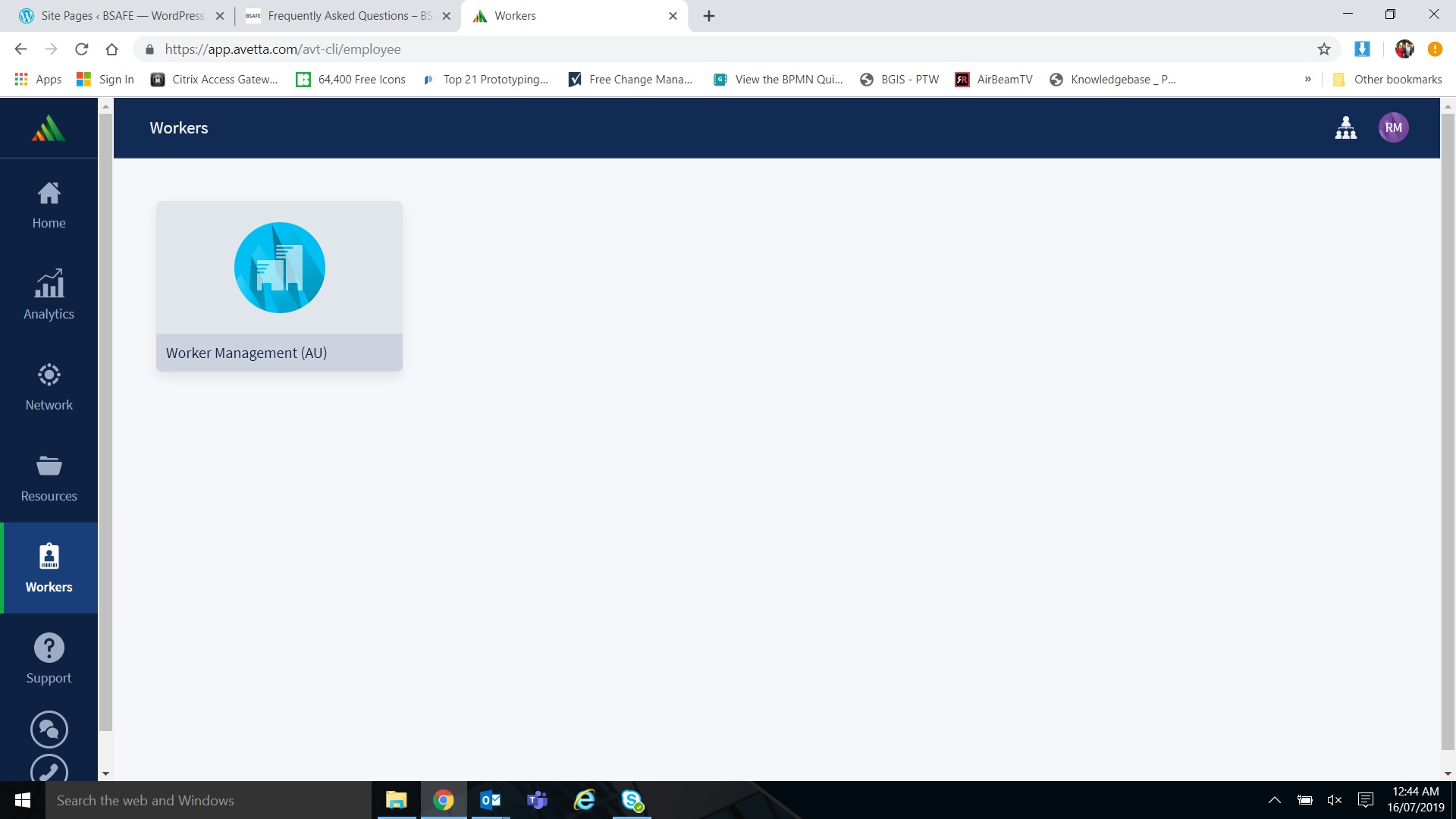
This video shows Vendor Admins how to add workers / technicians. It does not cover bulk worker creation, so here are the minimum details to do this:
- Go
to ‘Import Workers’; this can be found below ‘Create New’ which is the way
described in the video to add one worker
- Go to the sample spreadsheet provided by clicking ‘Example Import’ and choosing CSV as the output
- Fill out the spreadsheet, including worker minimum details (Login ID, Password, First Name, Last Name, Title, and Email) and uploaded back into that same page by choosing ‘Import Document’.
6. Why can’t I see my Technicians in the list available for assignment to a Work Order?
If a technician or group of technicians are not showing in the list of Technicians available, check Avetta Worker Management to ensure that their worker profile has been linked with the relevant microsite for the property that the Work Order is for.
A microsite is the profile for the BGIS client account property/ properties that the worker needs perform works at.
Under the Guides and Videos menu at the top of this page there is a document titled How to get ready for BSAFE that outlines this process step by step with screenshots.
 BSAFE
BSAFE 